
Log 28: Junk Drawer II - Electric Boogaloo

I've been busy since the last post, working on a bunch of relatively little things, but nothing big enough to warrant its own post.
The first thing I worked on was hiding the player's HUD during their Ultimate attacks (both individual and group attacks) and then displaying them again when the attack is over and control is returned to the player. This was all easy and straight forward, just building an event that the sequencers could call on the character that toggled the HUD's visibility.

While working on the Ultimate attack, I realized that because I was doing Sequence work with raw cameras, if the player is against a wall or other solid surface the camera will clip through it. I decided I needed to figure out a way to translate the animations to be on a Spring Arm, that way it would automatically zoom in if there's a wall in the way. Of course this led to me discovering that in order for the Spring Arm to work as I want it to, I can't be moving it on the local X-Axis as it will still put the camera through objects if it starts behind/in one. And, of course, the [Target Arm Length] variable isn't exposed to sequences so I had to build a Timeline to programmatically animate it over time. This all also applied to animating the camera for the long morph animation sequence.
[I wanted to put a GIF here of the new morph sequence to see the camera work, but the file was too big to be uploaded and it looks basically the same anyway.]
For the next little while I did work on different aspects of the bases.
The first thing I worked on is what I call "Locks" on the bases. What these do: in order to make any progress on capturing a base the player must first capture a different base. This isn't really a mechanic I've seen in other Warriors games, but my idea is it allows me to make more open maps but still require the player to move around and explore the full level to find the necessary bases to progress, instead of just finding the one end base and go straight for it. This is something I've wanted in other Warriors games because while some games let you gun straight for the finish and it feels good, that feeling doesn't last very long and gets old fast; versus most other Warriors games that have contrived reasons that the player can't finish and those just annoyed me (outside of story modes where plot was the reason). The locks on the bases seems like a good compromise.
In code, the Locks are just a map of base object references tied to Boolean values. If any of the Boolean values are true, then the locked base can not be damaged. Next I added a new dispatcher to bases that sent a conquering faction parameter. Locked bases bind to these dispatchers on the "Key" bases and if the conquering faction does not match the locked base's owning faction that lock is considered "Unlocked" and the Boolean value is set to false. Originally this had been a one-way process, but I decided some extra challenge would be fun and if a key base falls back under enemy control then the lock re-engages and the key base must be re-conquered. Thus the players need to keep an eye on the entire battle and can't just mindlessly run around the map. I don't intend for this to become a major problem on lower difficulties where the enemy AI has a hard time conquering bases, and it just provides some extra challenge on harder difficulties. Of course I'll have to test this once I get some enemy AI developed and make it possible for them to even conquer bases, as well as when I introduce difficulty levels (assuming I decide they aren't out of scope for a beginner project).
The HUD set up for the locks and keys was more challenging that I had thought it would be. Even creating the icons was a more involved process than I initially thought. The only easy part was that the Synty Icon pack that I have been using included not only a key icon, but also a closed lock and an open lock, so I had pictographic representations I could use. Then I had to figure out how to denote what keys would go to what locked bases so I decided to make the icons a basic white that way I could color code them. For example: if a player enters a base and sees that it has two red lock icons on it, the player knows they need to go find two bases with red keys and once they conquer those bases they will be able to come back here and conquer the locked base. I also put a ring around the icons, so that 1) they could stand out against a white background, and 2) a colored ring around the icon denotes which faction holds the corresponding key base (just a nice bit of extra information so players can keep what is going on in the battle straight). Of course wanting to keep the background white while having a colored ring meant that either I need to stack multiple masked images on top of each other, which can get expensive, or (and this is what I went with) I make a material that accepts a color and makes a ring around a white circle and that way I could use a single image without any transparency masking. For the placements of the icons, I decided to make the lock icons overlap the base health bar to denote that because of them the base's health can't change. I put the keys next to the base's name to show that that base is responsible for them. Doing this and keeping everything centered in the Base Health Bar Widget was an annoying chore: In order to have a centered Horizontal Box, a second Horizontal Box needs to be placed as a child of the first and surrounded by Spacers, then widgets get added to that nested Horizontal Box. It sounds easy, but it took me over a day to figure out.


Unrelated to the base locks and keys, but a change I made during the process was to move the faction colors out of the Game Instance and into a data table, that way they can be accessed from anywhere and not having to cast to my Game Instance type.
Back to bases: In order to eliminate a chain of casts to determine what kind of character has entered a base, I decided to move that function call onto the characters themselves. I did this by making an interface that I put on the bases that has different function calls depending on what kind of character enters. I also made a new Physics Object Response Channel for bases to occupy so only a specific collider on the characters could trigger the function calls.
The next part of bases I worked on was both having multiple captains protecting a base, as well as having them be represented by icons rather than text. Having multiple captains was seemingly easy in that I needed to change the single references for the classes and instances into arrays. But then the question became how to spawn them in. I started questioning this because I was playing Dynasty Warriors: Origins and they have the captains start spawned in and just stay in the bases. In addition they have set squads of basic enemies that follow them around. As well as enemies that can spawn outside of bases so that the journey from one base to another isn't just running. Ultimately unsure of how I wanted spawning to work I decided to re-build it in such a way that I had flexibility. I de-coupled spawning from the bases and made a separate spawner blueprint. At first I tried having the spawning be at random locations with the [GetRandomReachablePointInRadius] node, which required a navmesh (which was not a hardship since I will need that eventually when I do AI anyway). But, I didn't like how it looked, and it certainly didn't feel like actual squads of bad guys.

So I looked into AI formation solutions in the "Fab" store (Unreal's new asset marketplace). I was looking for a visual way to build formations without having to guess at vector offsets. I found a couple of plugins and asset packs but most of them were fairly expensive. I settled on the Formation System v2 by CodeSquril, both because it offered a visual way of assembling the offsets for a formation of enemies, and because it was cheaper. Turns out the actual formations tool was a separate program that I could have gotten my hands on without the purchase, but that would have felt bad to do so I'm glad I bought it.
I then got sidetracked by the fact that I didn't like how enemies would just pop into existence in front of the player, so I heavily modified a Niagara system that I had bought for a different purpose and use that to cover up the enemies spawning in.

I also put in a simple collider to keep the player from wandering into the area and still seeing the enemies popping into existence. Of course, now that I was spawning whole squads at a time, I run into the problem of slow downs (or I will when I scale everything up into 1,000s of enemies at a time). So I had to space the spawns out. Fortunately the Niagara system takes a little over a second to complete so I was able to space the spawns out over the course of a second. This should help alleviate those problems (though eventually implementing Object Pooling would also help but I didn't think of that at the time). I wound up having to create two new macros, because For Loops and Foreach Loops don't allow for delays to exist in their bodies, so I had to create delayable versions.
Finally, I could work on the enemy icons. I used a simple person icon from the Synty Icons pack and colored it based on the controlling faction's color. The only modification I really had to make was that in order to accommodate new captains I needed to modify the [Captain Entered/Exited Dispatcher] to also send the captain's faction.

The next thing was completely out of left field: I worked on making pickups to increase a player's supply of consumable items. Just having a little spinning object destroy itself on collision and increment a number was stupidly easy. So of course I couldn't settle for that. The first thing I did was program it to bounce following a curve if the player is already full up on that particular item when they run over it. Second, when they do pick up the item instead of just destroying it activates a particle effect to show it getting picked up.
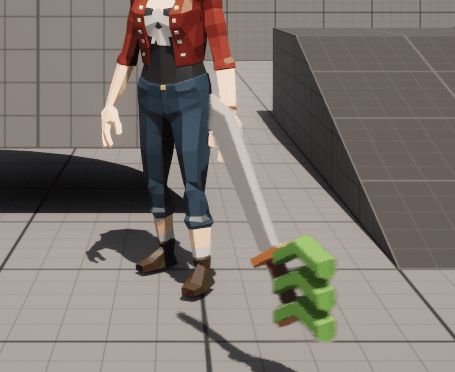
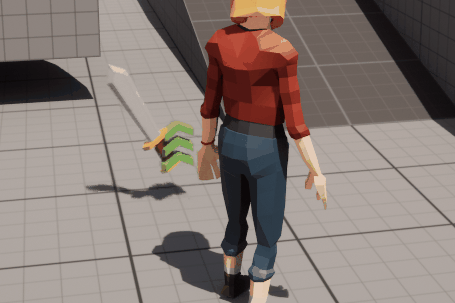
I also went the extra mile on the health pickups: If the player is below a certain health threshold then when they pick up the item it is automatically used.
Next on the chopping block was something that has been waiting on my to do list for a while: actually gaining Power when landing a hit on an enemy. I wound up putting a function call to the character's Stat Component in the loop inside the [Damage Hits] function in the Attack Controller. By putting the call in the loop the player can get even more Power back when they hit more than one opponent at a time, encouraging the 1-vs-1000 gameplay that Warriors titles live on. One thing I couldn't do without major modifications is not get Power back on weapon attacks (which, remember: they cost Power to do). I decided to just balance the numbers that in order for the player to break even on a weapon attack they have to hit a large number of enemies at once. I still need to to the number balancing but the functionality is there when I need it.

The next part of the game I worked on is something I worked on off and on throughout a couple other fixes but I started it here. It is something I was dreading doing and am not particularly good at: I started adding sound effects to my game. When I say I'm not good at sound, not only do I mean that I am NO Foley Artist (and hence need to purchase all my sounds from the Asset Store) but I'm a little bit pitch and tone deaf, so getting the right sound is difficult and I definitely can't modify them beyond basic volume adjustments. I did learn some basics of audio editing and sound effect work in school, so I can do enough to get the game across the finish line without being totally silent.
Enough of my weakest subject, back to programming!
While I was adding sound effects to the morph animations (and also when I was fixing the camera) I noticed that for the Long Morph, the L3 and R3 buttons wouldn't always trigger it. What I did to make the controls more consistent was move everything having to do with morphing out of the functions that handle the direct input out of the function, save for a single Boolean to show when the button is down or up. I then moved all the comparisons into a timer based function in the Tick event. Doing it this way allowed me to make the code input agnostic: I don't care which input is true or false, just that two of them are at the same time. This enabled me to use other Boolean operators besides just OR and AND (like the oft neglected XOR and NOR). Now the inputs work every time, yay!
One last small thing I worked on before moving onto a bigger project: When the player pushes the empower button then pushes the consumable button (or vice versa), or lets go of one of them when holding both: what should happen? Well before it was kind of a toss up what would happen because of the tangled mess that the morph code left them in. What I wanted to happen (and how I fixed it to work) is that if both are pressed within a small enough time frame (about 0.1 second) then the character should move into the 1st pre-morph stage, without either menu popping up; which was now happening with my last fix. Now what happens when one is held down and the other is pressed too long afterwards is that...nothing happens and the first menu just stays up. Also when both are held down, regardless of which was pressed first, when one is let go the other menu will open.

I was going to work on a bug with the Mount system next, but that required a full re-working of the mechanic, not to mention that it was an incomplete mechanic, and the mount system will be the subject of the next post.


Comments